
Book report presentation template
A book report presentation for primary and middle school: title, author, setting, main characters, plot without spoilers, favourite part, themes and a recommendation.
Paste your speech or IELTS notes and get cue cards that fit, laid out on A4 to print and cut. Free, no account needed.
No speech yet?Browse 166 templates
Your wording stays in one editable set from import through printing.
Paste your speech, upload a Word, PowerPoint or PDF file, or start from a template. Your words are not rewritten.
Smart Reflow splits the text between sentences, so each card can be read at a glance. Change the font or card size and the set reflows.
Print cut-ready cards on A4, rehearse one card at a time with a timer, or turn the set into flash cards and study.
Using Google Docs? Download the document as Microsoft Word or OpenDocument, then import that file.
Speeches, presentations, toasts and study decks, written to be spoken or studied. Open one, change the details, and print.
A book report presentation for primary and middle school: title, author, setting, main characters, plot without spoilers, favourite part, themes and a recommendation.
Flash cards on cell structure, organelles, plant and animal cells, bacteria, diffusion, osmosis, active transport, mitosis and microscopy for school biology.
Cue cards for a parent, sibling or friend giving an 18th or 21st birthday speech: growing-up stories, who they are now, hopes for the future and a toast.
Best man speech cue cards with a friendly opening, a story or two about the groom, kind words for his partner, thanks to the hosts and a toast that lands.
Speaker cue cards for a general business presentation: a clear opening, the key message, three supporting points with evidence, a recommendation, next steps and a strong close with Q and A.
A general debate case on cue cards: hook, definitions, team line, two or three arguments with evidence and impact, rebuttal space and a strong close. Works for most school formats.
Set up cards for class, university, work, events, or revision.
Cue cards, palm cards, note cards, index cards and prompt cards are all small cards with the key points of your speech. EasyPalmCards makes every one of them, or you can start from a sample speech.
Format text, check the print layout, or focus on one card. Each change appears on the cards as you make it.
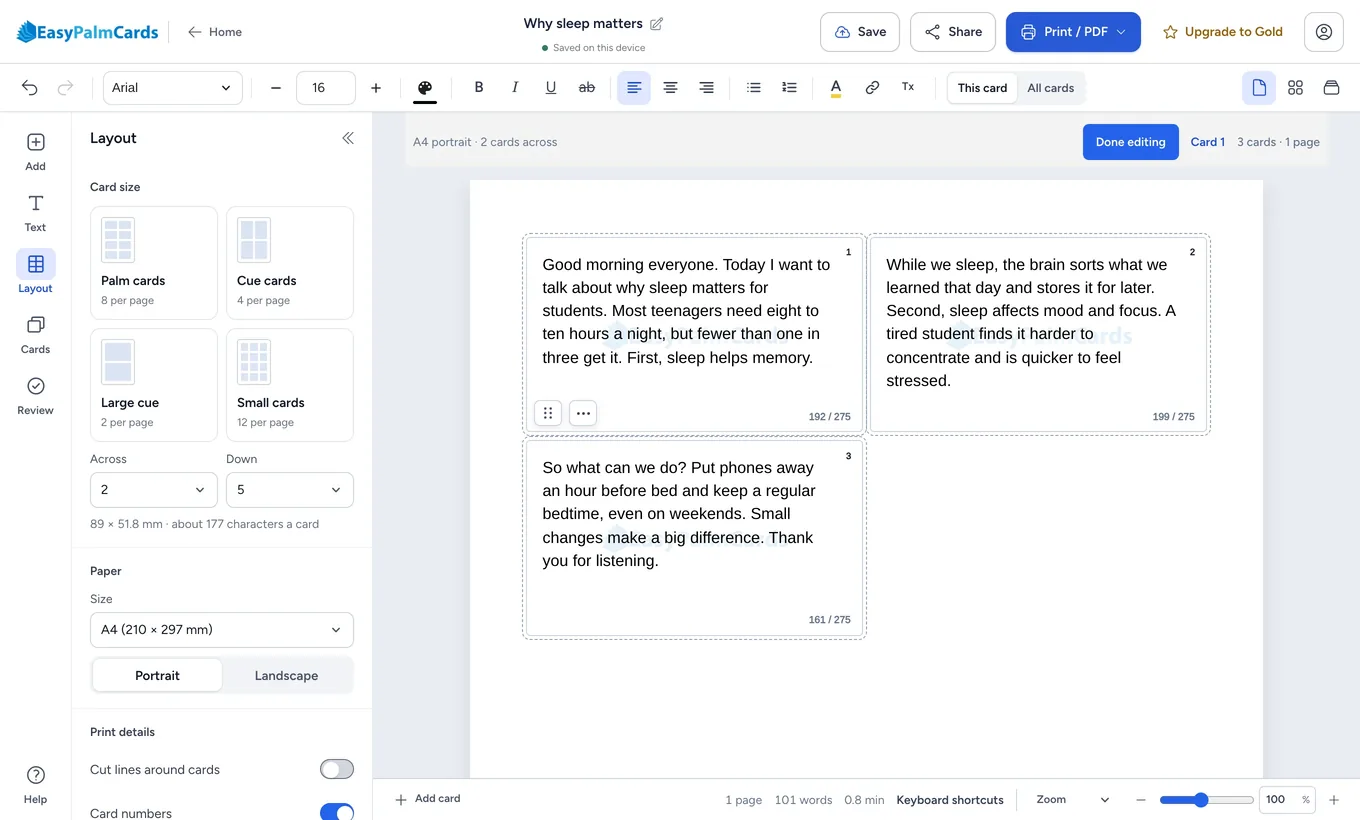
Change the font, card size, or page layout and the text redistributes across your set. Review the breaks, then keep editing normally.
Check the paper layout, scan every card, or rehearse one card at a time.
Use fonts, sizes, colour, emphasis, alignment, lists, indentation and headings.
Paper size, card measurements, margins, and borders carry through to printing and PDF export.
Present one card at a time or move through the complete set.
Use headings, bold terms, and short cues that scan quickly.
You can make cards with other tools too. Here is what each kind of tool does out of the box, so you can choose what suits your speech.
| EasyPalmCards | A word processor | Generic design tools | Flash card apps | |
|---|---|---|---|---|
| Splits your text into cards | Yes, between sentences | By hand | By hand, one text box at a time | One card at a time, typed in |
| Prints cards ready to cut | Yes, on A4 with cut lines | With a table or label template | After you set up the page | Varies by app |
| Rehearse a speech card by card | Yes, with a speech timer | Not built in | Not built in | Not built in |
| Study with spaced repetition | Yes: Learn, Test and Match | Not built in | Not built in | Yes, their main job |
| Start without an account | Yes, free | Varies | Varies | Varies |
These describe each kind of tool in general, not any one product. Word processors, design tools and flash card apps are great at their own jobs.
Free saves the current set on this device. Gold keeps sets in My Cards across devices, stores rehearsal runs, adds up to 300 AI actions a month, and removes ads and EasyPalmCards branding.
Compare Free and Gold$0 No credit card
₹124.92 INR / month, billed yearly
Need more help? The help pages cover importing, formatting, printing, sharing, and accounts.
Visit the help pagesIt splits a document or pasted speech into cue cards and arranges them on A4 or US Letter pages. You can change the card breaks and formatting before you print, export, share, or rehearse.
Yes. Australians say palm cards, most of the world says cue cards (sometimes prompt cards, or "queue cards" by mistake), and Americans say note cards or index cards. They all mean small cards with the key points of a speech, and EasyPalmCards makes all of them.
Not when you import a document. EasyPalmCards keeps your wording and changes the layout. Optional AI writing tools are separate, so nothing is rewritten unless you choose one of those actions.
Yes. The template library has speeches, presentations, toasts and study decks written in your language. Open one in the editor, change the details and print. Templates are free and need no account.
Yes. The editor supports rich-text formatting such as font family and size, bold, italic, underline, colour, alignment, lists, indentation, headings, links, undo, and redo. The page and ruler views make the printed result visible while you work.
Yes. Switch a set to flash cards to add a back to every card, print them double-sided, and study with Learn, Test and Match. Progress stays on your device; Gold syncs it between devices.
Yes. Free includes the editor, Smart Reflow, browser printing, 3 AI actions a month, and PDF export with a daily limit. Gold keeps sets in your account across devices, adds up to 300 AI actions a month and rehearsal history, removes the Free PDF quota, and removes ads and EasyPalmCards branding.
Yes. You can create, edit, rehearse, and export from a phone, tablet, or computer. The controls rearrange for smaller screens while the document remains the same.
The source file is stored privately while it is converted, then the source document is deleted. Your card set can remain in your browser, or in your account when you choose to save it with Gold.
Bring in your document and leave with cue cards sized, arranged, and ready to print.
No account required.